Let’s Encrypt for MQTT on Kubernetes
Our HTTP endpoints at Tenix get auto-renewed Let’s Encrypt certificates, and nobody ever thinks about them. Then the MQTT broker with plain TCP protocol needed the same, and it turned out that cert-manager does only half the job there. Issuing and renewing the certificate is easy. Getting the broker to actually serve the renewed one is a different story.
The problem
At Tenix we deal with real-time data coming from vehicles and chargers. When designing our external APIs, we decided to separate real-time APIs from static/historical ones. The static API is GraphQL; for real-time we use MQTT with a self-hosted EMQX 4.4. We also run everything on Kubernetes and our API gateway is exposed through ingress-nginx. The gateway primarily serves HTTP endpoints, which are easy to secure with TLS using cert-manager and Let’s Encrypt.
However, for MQTT we wanted exactly the same: a publicly trusted certificate, renewed automatically, with no manual steps. Clients verify the broker against their system CA store, so a self-signed certificate is not an option. Additionally, MQTT is not HTTP, so it never passes through an Ingress. This post shows how we closed that gap (securing non-HTTP TCP endpoints) at Tenix with cert-manager, Let’s Encrypt and Stakater Reloader.
The usual way: cert-manager, Let’s Encrypt and an Ingress
As I already mentioned, the standard way to set up automatic certificate renewal for HTTP starts with installing cert-manager in the Kubernetes cluster:
helm repo add jetstack https://charts.jetstack.io
helm repo update

helm install cert-manager jetstack/cert-manager \
  --namespace cert-manager \
  --create-namespace \
  --set crds.enabled=true
Then, crucially, the cluster also needs a ClusterIssuer:
apiVersion: cert-manager.io/v1
kind: ClusterIssuer
metadata:
  name: letsencrypt-issuer
spec:
  acme:
    server: https://acme-v02.api.letsencrypt.org/directory
    email: you@example.com
    privateKeySecretRef:
      name: letsencrypt-issuer-account-key
    solvers:
      - http01:
          ingress:
            ingressClassName: nginx
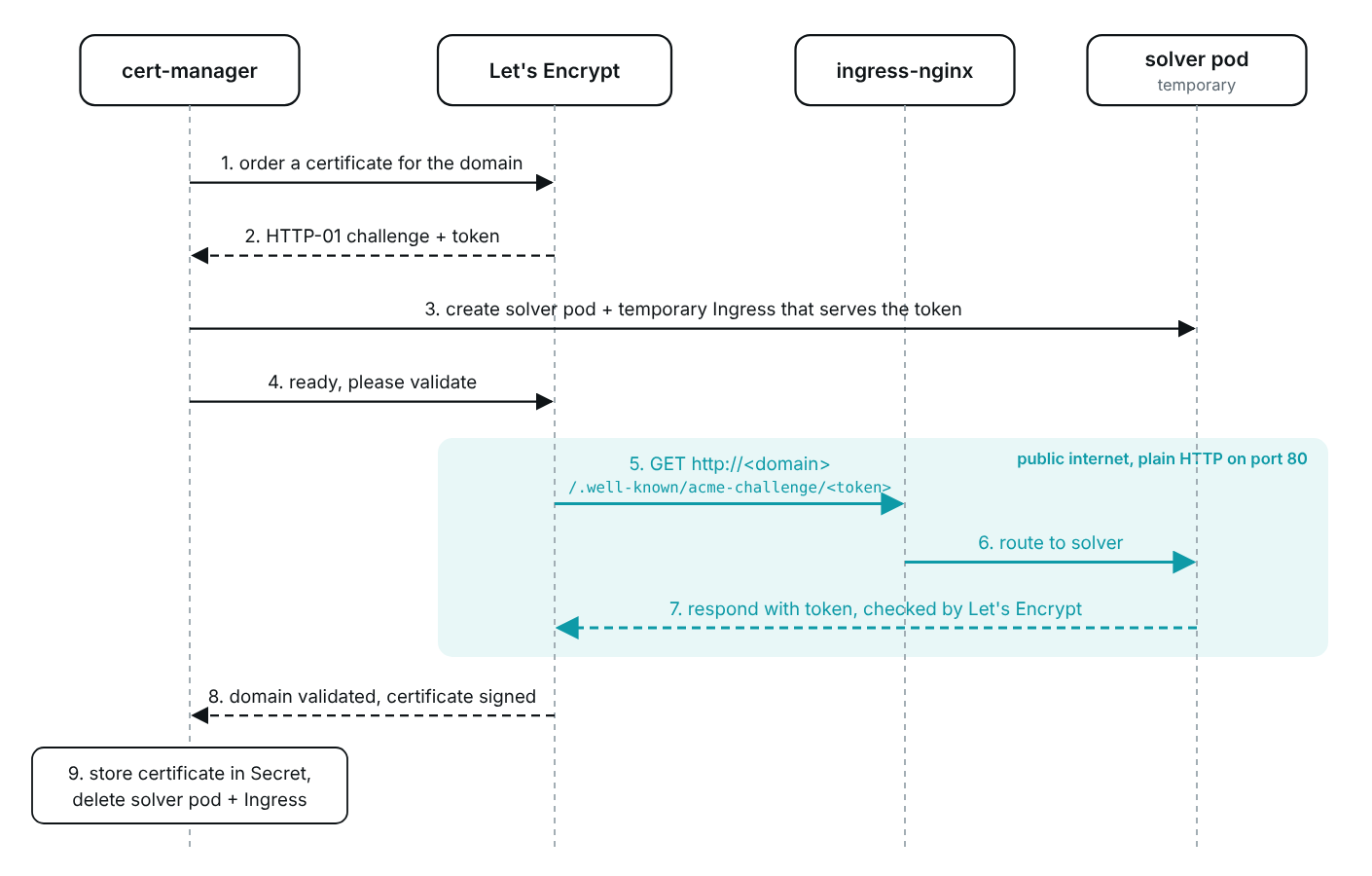
Before Let’s Encrypt will sign a certificate, it wants proof that you control the domain. The solver is the part of the ClusterIssuer that delivers that proof, and HTTP-01 is the simplest one. Let’s Encrypt hands cert-manager a token, and cert-manager spins up a short-lived solver pod and a temporary Ingress pointing at it (on the nginx class, as configured above). ingress-nginx picks up that Ingress and routes http://<domain>/.well-known/acme-challenge/<token> to the solver pod, which serves the token. Let’s Encrypt fetches that URL over plain HTTP on port 80, and if the content matches, the domain is validated and the certificate is issued. cert-manager then removes the temporary solver pod and Ingress.
After that, the Ingress of every externally exposed service needs an annotation that tells cert-manager which ClusterIssuer to use:
apiVersion: networking.k8s.io/v1
kind: Ingress
metadata:
  name: tenix-todp-api-gateway
  namespace: platform
  annotations:
    cert-manager.io/cluster-issuer: letsencrypt-issuer
spec:
  ingressClassName: nginx
  tls:
    - hosts:
        - example.com
      secretName: example-com-tls
  rules:
    - host: example.com
      http:
        paths:
          - path: /graphql
            pathType: Prefix
            backend:
              service:
                name: tenix-todp-api-gateway
                port:
                  number: 80
Two controllers do the work here, and neither needs to know about the other. cert-manager watches Ingresses: when it sees the cert-manager.io/cluster-issuer annotation, it creates a Certificate for the hosts listed under tls and stores the result in the example-com-tls Secret. ingress-nginx watches the same Ingresses, plus the Services, Endpoints and Secrets they reference, and updates its configuration whenever any of them change. That is what makes the challenge work: when the temporary solver Ingress appears, ingress-nginx starts routing /.well-known/acme-challenge/<token> for that host to the solver pod, and the route disappears once cert-manager deletes the Ingress. It is also what makes renewal invisible: when cert-manager writes a renewed certificate into the Secret, ingress-nginx starts serving it without restarting.
For the full setup, follow the official cert-manager guide Securing NGINX-ingress.
That is how we get TLS on the API gateway at Tenix without ever thinking about renewal. Keep these two controllers in mind, because for MQTT, neither of them is involved.
A side note: in November 2025 Kubernetes SIG Network announced the retirement of ingress-nginx, with best-effort maintenance ending in March 2026. The setup above still works, but if you are starting fresh, look at a maintained controller or the Gateway API. The cert-manager part of this post does not depend on it.
EMQX: cert-manager still issues, nobody reloads
Take ingress-nginx out of the picture (because we want to secure a non-HTTP endpoint), and both controllers from the previous section stop helping. That splits the problem in two: getting a certificate issued, and getting EMQX to serve it. The first one turned out to be easy. The second one took more effort.
Issuing: cert-manager does not need an Ingress
The Ingress annotation is only a shortcut. Under the hood cert-manager creates a Certificate resource, and you can create one directly. The result is the same: a kubernetes.io/tls Secret with tls.crt and tls.key, renewed automatically.
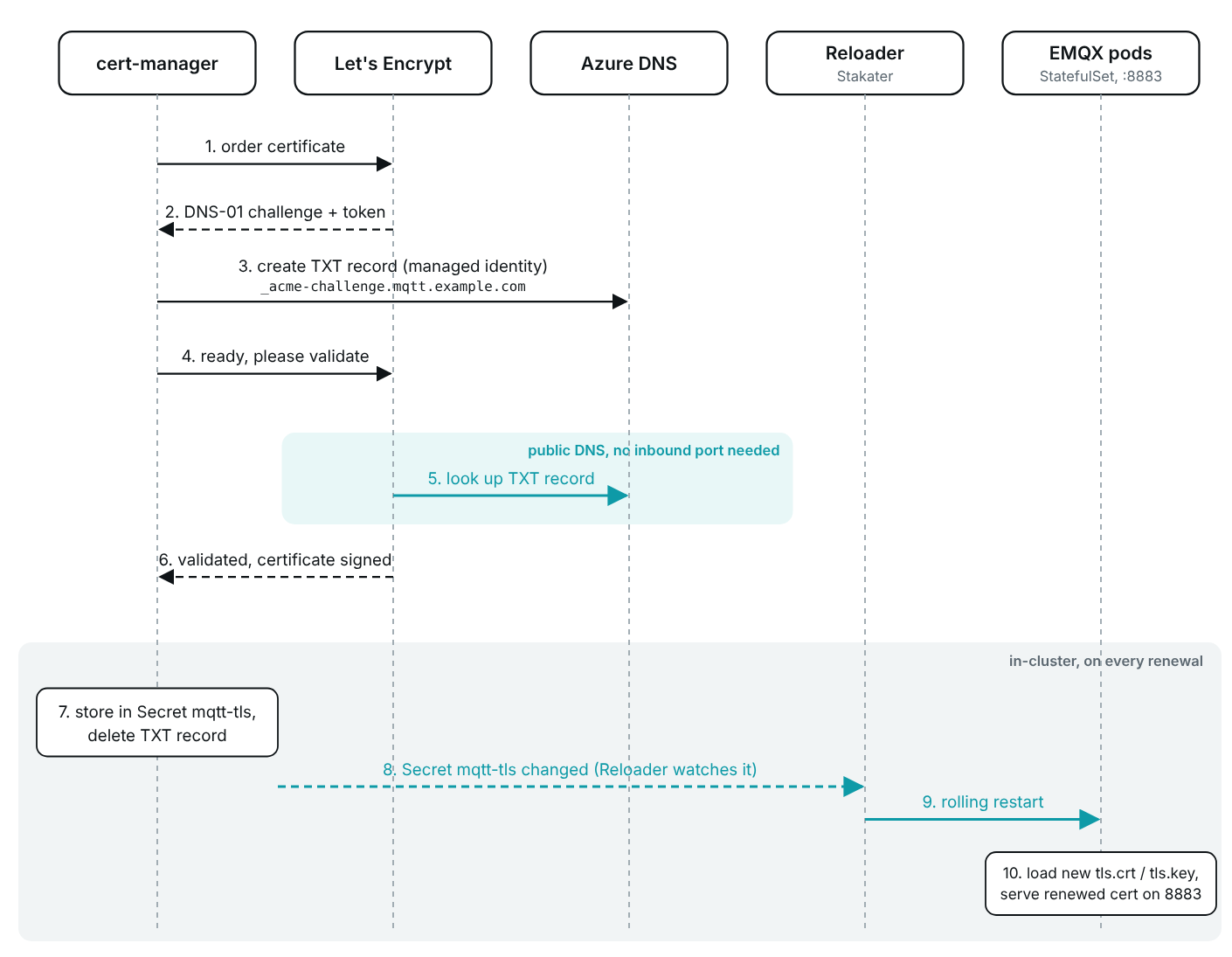
What does not work for EMQX is the HTTP-01 solver. mqtt.example.com resolves to the EMQX LoadBalancer, and that IP is configured to only accept MQTT ports, in our case 8883. There is no ingress-nginx behind it to route /.well-known/acme-challenge/<token>, so the challenge would never succeed. We could have opened port 80 on that IP and pointed it at ingress-nginx just for the challenge, but that is extra setup whose only job would be to keep a certificate validation path alive. Instead, this certificate uses DNS-01: cert-manager proves control of the domain by creating a TXT record _acme-challenge.mqtt.example.com, and Let’s Encrypt checks the DNS record instead of the host. Our zone lives in Azure DNS, and cert-manager authenticates to it with a managed identity, so there is no DNS API key to store or rotate.
apiVersion: cert-manager.io/v1
kind: ClusterIssuer
metadata:
  name: letsencrypt-dns
spec:
  acme:
    server: https://acme-v02.api.letsencrypt.org/directory
    email: you@example.com
    privateKeySecretRef:
      name: letsencrypt-dns-account-key
    solvers:
      - dns01:
          azureDNS:
            subscriptionID: <subscription-id>
            resourceGroupName: <resource-group>
            hostedZoneName: example.com
            environment: AzurePublicCloud
            managedIdentity:
              clientID: <managed-identity-client-id>
---
apiVersion: cert-manager.io/v1
kind: Certificate
metadata:
  name: mqtt-tls
  namespace: infra
spec:
  secretName: mqtt-tls
  dnsNames:
    - mqtt.example.com
  issuerRef:
    name: letsencrypt-dns
    kind: ClusterIssuer
  privateKey:
    algorithm: RSA
    size: 2048
    rotationPolicy: Always
Serving: new files, old certificate
EMQX terminates TLS itself, so the certificate has to end up on its filesystem. We mount the Secret into the pod and point the SSL listener at the files. With the EMQX 4.4 Helm chart that is a few lines of values (for readability, everything unrelated to TLS was removed):
emqxConfig:
  EMQX_LISTENER__SSL__EXTERNAL__CERTFILE: "/opt/emqx/etc/certs/letsencrypt/tls.crt"
  EMQX_LISTENER__SSL__EXTERNAL__KEYFILE: "/opt/emqx/etc/certs/letsencrypt/tls.key"

extraVolumes:
  - name: mqtt-tls
    secret:
      secretName: mqtt-tls

extraVolumeMounts:
  - name: mqtt-tls
    mountPath: "/opt/emqx/etc/certs/letsencrypt"
    readOnly: true

service:
  type: LoadBalancer
  mqttssl: 8883
The Secret is mounted as a whole directory, and that matters. The kubelet keeps mounted Secret files in sync with the Secret, so after a renewal the new tls.crt and tls.key show up in the pod after a short delay. That only works without subPath: a subPath mount is a copy made at pod start, and it never changes afterwards.
So far, so good. But in our setup EMQX 4.4 kept serving the certificate it loaded when the listener started, and the new files on disk did not change what it served. After a renewal we ended up with the new certificate on disk and the old one in the process memory.
Here is what that means in practice. cert-manager renews a 90-day certificate 30 days before expiry, so on renewal day everything looks fine: the Certificate is Ready, the Secret is fresh, the files in the pod are fresh. The broker keeps serving the old certificate for another 30 days, and then every client fails the TLS handshake at the same moment. For HTTP, ingress-nginx did this last step for us, picking up the updated certificate on its own.
For EMQX, someone has to restart the broker after every renewal, and doing that by hand every 60 days is exactly the manual step we wanted to get rid of.
And that interval is only getting shorter. Let’s Encrypt is cutting certificate lifetimes: the default profile moves to 64-day certificates on 10 February 2027 and to 45-day certificates on 16 February 2028. cert-manager renews at two thirds of the lifetime by default, so the manual restart would come roughly every 43 days, and later every 30.
The fix: Stakater Reloader
So what we needed was some tool or automated process that would notice the change and restart the EMQX broker. A quick online search turned up Stakater Reloader.
In the project’s own words:
Reloader is a Kubernetes controller that automatically triggers rollouts of workloads (like Deployments, StatefulSets, and more) whenever referenced
Secrets,ConfigMapsor optionally CSI-mounted secrets are updated.
In practice, Reloader is a small controller that watches ConfigMaps and Secrets and, when one of them changes, triggers a rolling restart of the Deployments, StatefulSets and DaemonSets annotated for it. The annotations live on the workloads, so nothing in the application itself has to change.
That sounds exactly like the tool we need. With a little configuration, we got the whole chain working:
- a DNS-01 ClusterIssuer for DNS-based certificate issuance
- the Secret mounted as files into the EMQX pods
- Stakater Reloader restarting the pods, so that EMQX picks up the renewed certificate
helm repo add stakater https://stakater.github.io/stakater-charts
helm repo update

helm install reloader stakater/reloader \
  --namespace reloader \
--create-namespaceapiVersion: apps/v1
kind: StatefulSet
metadata:
name: emqx
namespace: infra
annotations:
# restart EMQX only when this Secret changes
secret.reloader.stakater.com/reload: "mqtt-tls"# the EMQX 4.4 chart has no value for StatefulSet annotations,
# so we add it to the live object
kubectl -n infra annotate statefulset emqx \
secret.reloader.stakater.com/reload="mqtt-tls"With all the above, we finally got our Tenix EMQX cluster working with automatically updated TLS certificates for non-HTTP traffic.
Gotchas and alternatives
Unfortunately, not everything is as beautiful as it looks at first glance. The solution has some drawbacks.
Restarting a service
For EMQX, or any other workload Reloader restarts, open connections are terminated when the pods restart. Depending on the EMQX deployment, that might mean a short outage. At Tenix, we run the Platform API EMQX with three instances, so a rolling restart fits our HA setup. Nevertheless, every connection on a restarted pod gets dropped. And it is not only the TCP connection: by default, EMQX 4.x keeps persistent sessions (clean_session=false) in the memory of the node that holds them, so a restarted pod takes those sessions and their queued QoS 1 and 2 messages with it. Clients reconnect without a session and have to subscribe again.
EMQX 4.4 StatefulSet annotations
The official EMQX 4.4 Helm chart has no value for annotations on the EMQX StatefulSet. That means running kubectl annotate ... after every successful helm upgrade ..., whether the EMQX cluster is upgraded or installed from scratch. How much that hurts depends on how you deploy and maintain your cluster. At Tenix, infrastructure upgrades run through scripts executed by the engineer doing the upgrade, so the annotation is one more step in those scripts.
EMQX 5.x
In newer versions of EMQX, certificate reloading is already solved by the broker itself. Certificate files referenced by path are checked and reloaded periodically, every 120 seconds by default, without a listener restart. The outcome is the same as with ingress-nginx: a renewed certificate gets served without anyone touching the pods. For Tenix, that means that once we upgrade to 5.x, we can drop the Stakater Reloader deployment.
Summary
Ultimately, cert-manager does not really care which protocol (HTTP, MQTT or anything else over TCP) you serve. With a DNS-01 solver it issues and renews Let’s Encrypt certificates for anything, an MQTT broker included, no Ingress required. What you lose (or at least might lose) when you step outside ingress-nginx is the reload: the renewed certificate lands in the Secret and in the pod, but picking it up is up to the software itself. Stakater Reloader closes that gap with one annotation, at the price of a rolling restart and dropped connections on every renewal. For us at Tenix, with three EMQX instances and clients that reconnect, that is a trade worth making until we move to EMQX 5.x.
How do you handle certificate rotation for non-HTTP endpoints? Native hot reload, the cert-manager csi-driver, something else entirely? Let me know in the comments.
Links
- EMQX
- cert-manager
- Let’s Encrypt
- ingress-nginx
- Stakater Reloader
- cert-manager: Securing NGINX-ingress
- cert-manager: Certificate resource
- cert-manager: Azure DNS solver
- Let’s Encrypt challenge types (HTTP-01, DNS-01)
- Kubernetes: Secrets
- EMQX 4.4 Helm chart
- EMQX: SSL/TLS certificates
- Let’s Encrypt: from 90 to 45 days
- Ingress NGINX retirement